




Search
Related News
- 00
0000-00
What drives rail vehicle dynamics cost during high-speed bogie design? - 00
0000-00
How rail transit integration testing exposes interface failures before commissioning - 00
0000-00
How to verify aircraft composite material certification for flight use - 00
0000-00
How to qualify titanium aircraft forgings for fatigue-critical parts - 00
0000-00
How to prepare objective evidence for a Nadcap audit
Battery Thermal Management Systems: Common Failure Causes




Battery Thermal Management Systems: Common Failure Causes
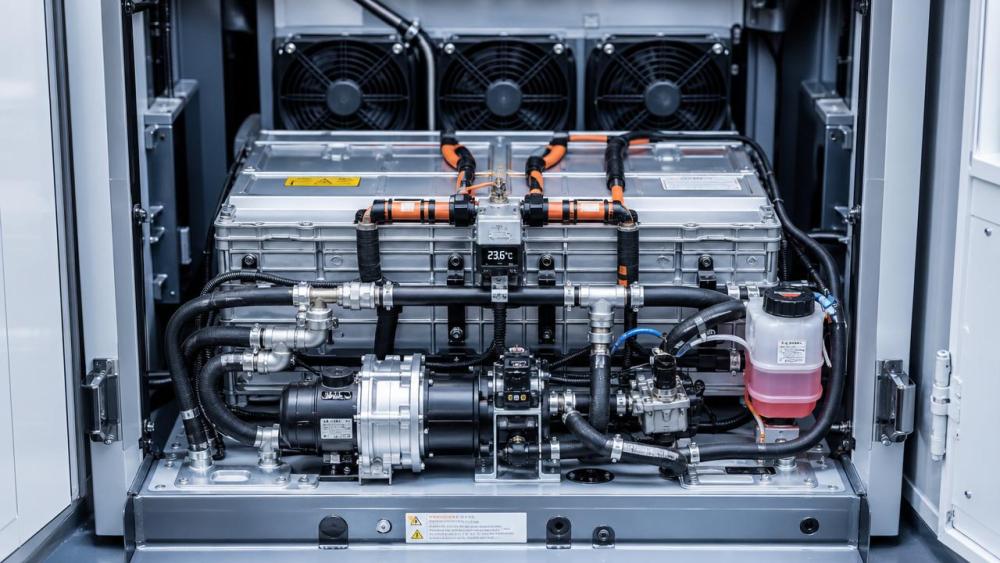
Battery thermal management systems sit at the center of safety, uptime, and battery life.
When they fail, the result is rarely just higher temperature.
It often means reduced range, derating, uneven aging, alarms, and repeat service calls.
That matters in aircraft support equipment, rail systems, industrial vehicles, and other demanding transport applications.
The good news is that most battery thermal management systems fail in recognizable ways.
If the early signals are caught, downtime drops and root causes become easier to isolate.
This guide breaks down the most common failure causes, what they look like in the field, and how to respond with practical troubleshooting steps.
Why Battery Thermal Management Systems Fail More Often Than Expected
Many failures start outside the thermal unit itself.
Contaminated coolant, vibration, poor routing, software mismatch, and deferred maintenance all create hidden stress.
In real service conditions, battery thermal management systems must handle changing loads, fast charging, ambient swings, and irregular duty cycles.
That combination exposes weak seals, inaccurate sensors, blocked channels, and unstable control behavior much faster than bench testing does.
A useful rule is simple.
If temperature spread increases before average temperature rises, distribution is failing before cooling capacity fails.
Coolant Leaks and Low Flow Problems
Coolant leaks remain one of the most common battery thermal management systems issues.
They usually appear at hose joints, pump seals, manifolds, cold plates, or fittings exposed to vibration.
A slow leak is especially dangerous because performance drifts gradually.
The system may still run, but heat transfer becomes inconsistent.
Common signs include:
- Frequent topping up without a visible external spill
- Hot spots near module edges or far-end channels
- Pump cavitation noise or intermittent flow alarms
- Reduced cooling during peak power events
Low flow does not always mean a leak.
It can also come from air pockets, filter blockage, collapsed hoses, or partial obstruction inside cooling plates.
In battery thermal management systems, low flow often raises temperature difference faster than overall pack temperature.
That pattern is a strong diagnostic clue.
What to Check First
- Compare inlet and outlet temperatures under load.
- Review pump current, flow readings, and pressure drop trends.
- Inspect fittings for dried residue, staining, or coolant odor.
- Bleed trapped air before replacing major components.
Clogged Channels, Fouling, and Coolant Degradation
Another repeat problem in battery thermal management systems is restricted heat exchange.
The cause may be particles, corrosion products, biological growth, additive breakdown, or mixed coolant chemistry.
As channels narrow, pressure rises and cooling uniformity falls.
This is common after unplanned top-ups with the wrong fluid.
It also shows up when service intervals are stretched too far.
In practical terms, battery thermal management systems may appear healthy at low load, then lose control quickly during rapid charging or high ambient operation.
That delayed failure pattern points to marginal thermal transfer, not total component loss.
Field Response
- Sample coolant and check color, clarity, and contamination.
- Confirm coolant specification against service records.
- Measure pressure drop across filters and heat exchangers.
- Flush only with approved procedures and compatible fluids.
Sensor Drift and False Temperature Feedback
Not every overheating alarm means real overheating.
Battery thermal management systems depend on accurate sensor input for every control decision.
If a temperature sensor drifts, loses contact, or reads slowly, the controller reacts to the wrong condition.
That can trigger unnecessary cooling, delayed cooling, or repeated fault resets.
In transport applications, vibration and connector wear are common reasons.
So are harness strain, moisture ingress, and calibration drift after long service cycles.
A clear warning sign is a sensor that changes too quickly or not at all compared with nearby points.
That mismatch often reveals the issue faster than a fault code does.
Practical Diagnostic Method
Trend all related sensors during the same operating event.
Look for one channel that leads or lags beyond the thermal mass expectation.
Then verify connector integrity before replacing the sensor itself.
Fan, Pump, and Actuator Wear
Mechanical wear is a direct reliability threat in battery thermal management systems.
Fans lose efficiency as bearings age and blades collect debris.
Pumps lose output because of seal wear, impeller erosion, or cavitation damage.
Valves and dampers can also stick, especially after long low-activity periods.
What makes this tricky is that components often degrade before they fail completely.
Battery thermal management systems may still pass a basic start check while underperforming in actual service.
More obvious signals include rising motor current, unusual vibration, speed instability, or weaker airflow at the same command level.
Useful Maintenance Triggers
- Current draw moves upward with no matching load increase
- Noise signature changes after warm-up
- Cooling response time gets longer over several service cycles
- Actuator command and actual position no longer align
Control Logic Faults and Software Mismatch
Some of the hardest battery thermal management systems failures come from controls rather than hardware.
A software update, parameter change, or communication delay can alter cooling behavior without any visible physical damage.
This may show up as late fan activation, unstable pump cycling, or poor coordination with the BMS.
In integrated vehicles or transport platforms, interface mismatch is a common source of repeat complaints.
For example, the battery thermal management systems controller may expect one temperature threshold while the main system uses another.
The result is conflict, hunting, or nuisance alarms.
When symptoms start immediately after firmware work, configuration should be checked before hardware replacement.
Best Checks After an Update
- Verify software version and parameter set.
- Confirm BMS and thermal controller communication mapping.
- Compare activation thresholds with the approved baseline.
- Review event logs for command delays or logic conflicts.
Environmental and Installation-Related Causes
Battery thermal management systems also fail because the installation environment changes over time.
Dust loading, salt exposure, vibration, restricted airflow, and poor service access all increase failure probability.
In high-speed rail, aerospace ground support, and industrial transit settings, contamination can build quickly.
Even a correctly designed system can perform badly when intake paths are blocked or harnesses rub against nearby structures.
This also means recurring failures are often layout issues, not bad replacement parts.
A Practical Troubleshooting Sequence
The fastest way to diagnose battery thermal management systems is to follow the heat path.
Start with whether heat is being detected correctly.
Then check whether heat is being moved effectively.
Finally, confirm whether the controller responds at the right time.
- Validate alarms against real temperatures.
- Check coolant condition, level, flow, and pressure drop.
- Inspect fans, pumps, valves, and connectors under load.
- Review software versions, thresholds, and event logs.
- Look for repeat patterns linked to ambient, charging, or route duty.
This order prevents random part swapping.
It also helps separate true battery thermal management systems failure from upstream electrical or operational causes.
How to Reduce Repeat Failures
The most effective improvement is trend-based maintenance.
Battery thermal management systems rarely jump from healthy to failed without warning.
They usually show slower cooling response, wider temperature spread, unstable flow, or rising actuator effort first.
Capturing those trends turns service from reactive to preventive.
- Keep coolant specifications tightly controlled
- Log sensor deviations, not just hard faults
- Inspect vibration-sensitive joints during routine service
- Baseline fan and pump current after replacement
- Lock approved software and parameter versions
In day-to-day work, this creates faster diagnosis and fewer repeat visits.
It also protects battery life, which is often the biggest hidden cost behind thermal faults.
Final Takeaway
Most battery thermal management systems problems come back to flow loss, heat transfer loss, bad feedback, worn actuators, or control mismatch.
Once those five areas are checked in sequence, troubleshooting becomes much more predictable.
For demanding transport and industrial platforms, the best results come from combining physical inspection with trend data and configuration control.
That approach keeps battery thermal management systems reliable, reduces avoidable downtime, and prevents the same fault from returning next month.
Related News
- When does condition based predictive maintenance pay off for traction convertersAug 20, 2026Condition based predictive maintenance pays off for traction converters when it improves intervention timing, parts planning, and fleet priorities—cutting failures, waste, and disruption.
- EMU Traction Converters Explained: Key Performance Metrics That Matter in Specification ReviewsJul 10, 2026EMU traction converters explained clearly: discover the key performance metrics that shape efficiency, thermal stability, reliability, and smarter procurement decisions.
- EMU Traction System Engineering: Key Risks in Converter IntegrationJul 07, 2026EMU traction system engineering insights on converter integration risks, covering interfaces, thermal loads, software coordination, and EMC control to improve delivery success.
- Traction Converters vs Inverters: Key Differences That Affect EMU PerformanceJul 03, 2026Traction converters vs inverters explained: learn how traction converters influence EMU efficiency, braking, reliability, and lifecycle cost for smarter technical evaluation.